Make a Resume on Your Phone — Free Mobile Resume Builder
Create, edit, and download a professional resume from your iPhone or Android phone. JobScoutly is a mobile friendly resume builder with ATS-friendly templates, AI writing help, and free PDF downloads — no app, no laptop needed.
- iPhone & Android
- Free — no credit card
- PDF download, no watermark
- No app to install
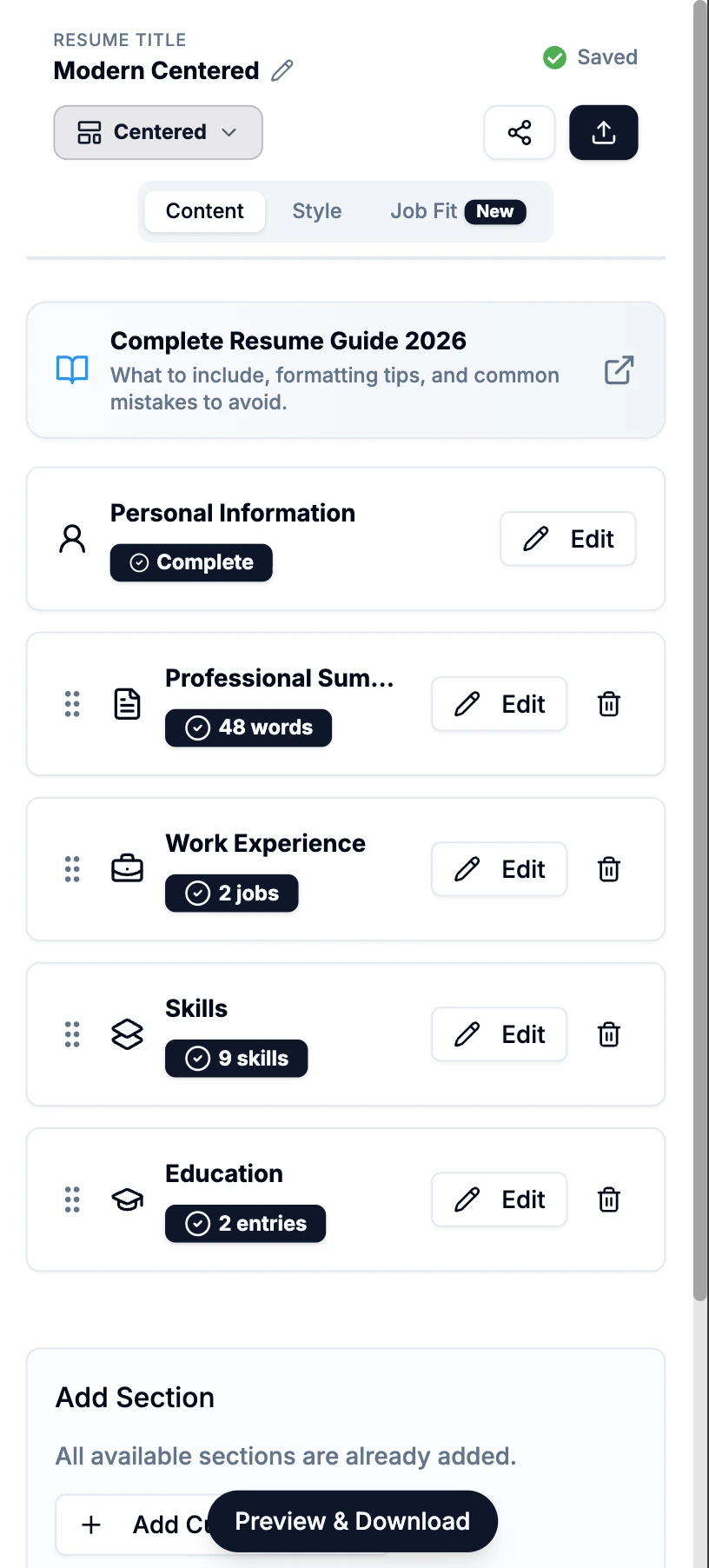
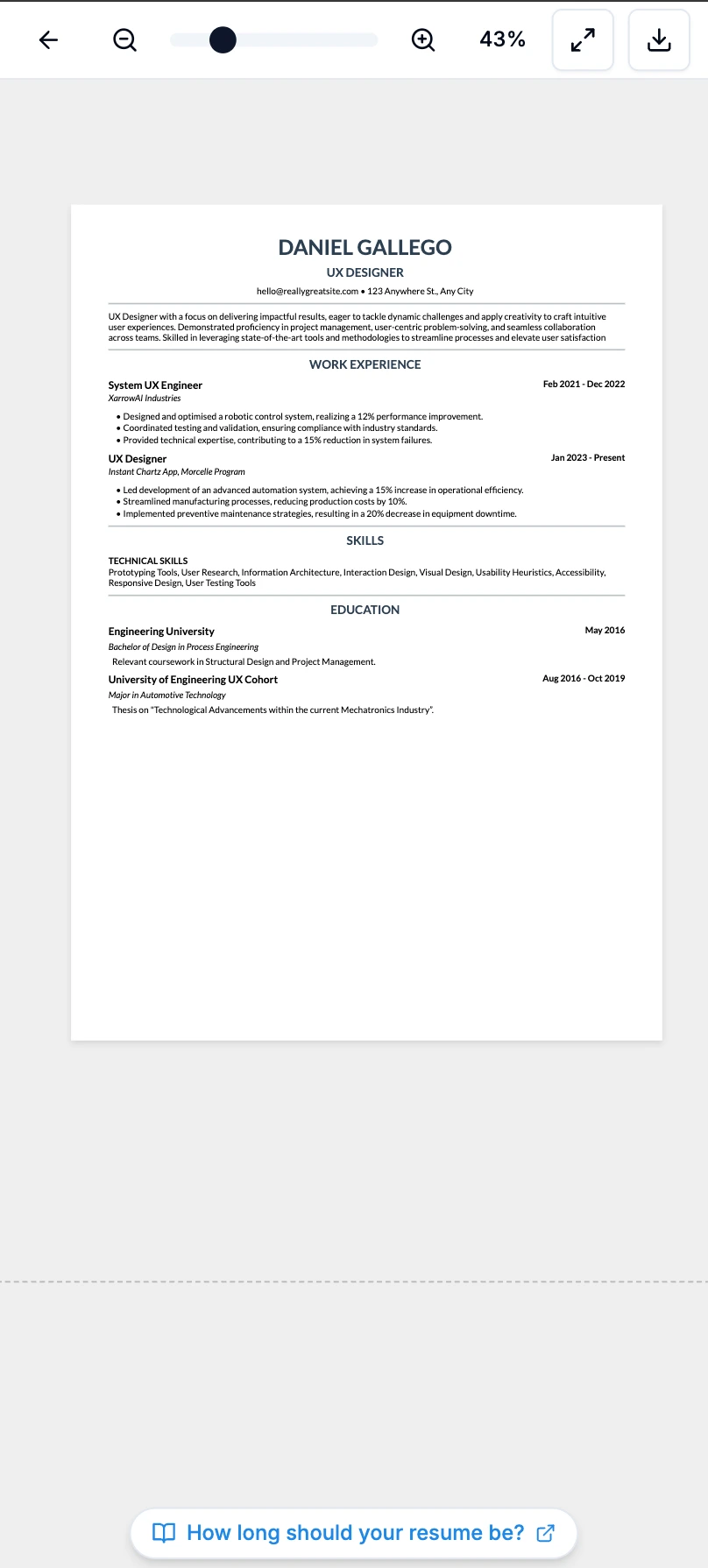
Yes — you can make a resume entirely on your phone. Open JobScoutly in Safari (iPhone) or Chrome (Android), add your experience, let AI write your bullet points, choose an ATS-friendly template, and download a clean PDF straight to your phone. No laptop, no app, and no cost.
Stop fighting resume formatting on a tiny screen
Trying to build a resume in Word or Google Docs on your phone means pinching, zooming, nudging margins, and hoping the PDF still looks right when you're done. JobScoutly keeps the layout stable while you fill in simple, mobile-friendly fields — so it stays polished no matter how small your screen is. Every mobile friendly resume template holds that layout on a small screen and still parses cleanly when an employer's software reads it.
How to make a resume on your phone
Four simple steps, entirely from your phone.
-
Choose a mobile-friendly template
Start with an ATS-friendly template that looks right on a phone screen — no fiddly formatting.
-
Add your experience, skills & education
Fill in your details in a big, tap-friendly editor. Or upload a resume you already have.
-
Improve your bullet points with AI
Skip the tiny keyboard — let AI turn your role into crisp, recruiter-ready bullet points.
-
Download as a PDF
Tap download and save a clean, watermark-free PDF straight to your phone. Free, unlimited.
Why JobScoutly works so well on mobile
Most resume builders feel like desktop tools squeezed onto a phone. JobScoutly is designed to feel simple on a phone from the first tap — whether you create a resume on your phone from scratch or edit one you already have.
-
A large, tap-friendly editor
Built for a phone screen — big touch targets and simple controls, not a desktop tool crammed onto mobile.
-
No tiny Word or Google Docs formatting
No pinch-zooming to fix margins or wrestling a document that breaks the moment you touch it. Your layout just holds.
-
ATS-friendly templates
Every template is designed to be ATS-friendly — clean layouts, standard section headings, and readable formatting — so a resume you make on your phone reads well to recruiters and their software.
-
Instant preview & PDF download
See exactly how your resume looks, then download a clean PDF to your phone in one tap.
-
Save now, edit later
Your resume is saved to your account. Start on the bus, finish at home — same resume, any device.
-
AI writes the hard part
The worst part of a resume on a phone is typing it. AI drafts your summary and bullet points so you barely type at all.
How to make a resume on iPhone
You don't need an app from the App Store. Open jobscoutly.com in Safari (or Chrome) on your iPhone and sign in with Google or email. Build your resume in the mobile editor — or upload one you already have — and use AI to polish your bullet points. When you're done, tap download and the PDF saves straight to your Files, ready to attach to any application or share from your phone.
- Works in Safari or Chrome — nothing to install
- Saves the PDF to Files, or share it anywhere
- Pick up on your Mac or iPad later — it's all saved
How to make a resume on Android
Same idea on Android — no Google Play download required. Open jobscoutly.com in Chrome, sign in, and build your resume in the tap-friendly editor. Download the finished PDF to your Downloads folder, then send it straight to a job application or Google Drive.
- Runs in Chrome — no app install
- PDF downloads to your phone in one tap
- ATS-friendly output, same as on desktop
Word, Google Docs, or a resume builder?
All three can technically make a resume on a phone, but they're not equally suited to it.
Full document editing
Hard to manage margins and spacing on a small screen
Basic text editing and sharing
Layout can shift when exporting to PDF
Guided resume creation
Some are not truly free or mobile-friendly
Free mobile resume creation
Built for iPhone and Android, with PDF downloads and no app install
If you already know exactly how to format a resume, Word or Google Docs can work. But if you want the fastest path from phone to finished PDF, a mobile resume builder is usually easier — the layout stays stable while you just fill in the content.
Make a resume on your phone — free
JobScoutly is genuinely free. No trial that expires, no "download" button that asks for a card at the last second. Here's exactly what you get for free from your phone:
- Unlimited resumes and unlimited edits
- AI writing assistant for summaries & bullet points
- Unlimited PDF downloads — no watermark
- No credit card, ever
It's the same builder on any device — the free ATS resume builder covers how the templates handle applicant tracking systems in more detail.
Common mistakes when making a resume on your phone
A few small mistakes trip people up when they build on mobile. Avoid these:
-
Using a template that is too fancy
Photos, columns, and graphics look nice but can break ATS parsing.
-
Forgetting to preview the PDF
Always check the finished file before you send it — small screens hide layout problems.
-
Exporting an image instead of a PDF
Screenshots and image files may not parse correctly in applicant tracking systems, so PDF is the safer choice.
-
Making the resume too long
Aim for one page; two only if you have a long career.
-
Typing generic bullet points
"Responsible for…" says nothing. Lead with results and numbers.
-
Not saving a copy before applying
Keep the PDF on your phone so you can reuse and tweak it.
Frequently asked questions
Can I make a resume on my phone?
Yes. You can build a complete, professional resume entirely on your phone — no laptop required. JobScoutly runs in your phone's web browser (Safari on iPhone, Chrome on Android), so you can add your experience, let AI write your bullet points, pick an ATS-friendly template, and download a polished PDF, all from your phone.
How do I make a resume on my iPhone?
Open jobscoutly.com in Safari (or Chrome) on your iPhone and sign in with Google or email — there's no app to install. Start from scratch or upload an existing resume, fill in your details, use the AI writing assistant to improve your bullet points, choose an ATS-friendly template, and tap download to save the PDF straight to your Files or share it anywhere.
How do I make a resume on my Android phone?
It works exactly the same on Android. Open jobscoutly.com in Chrome, sign in, and build your resume in the mobile editor. When you're done, download the PDF to your phone's Downloads folder or send it directly to an application — no app install needed.
Do I need to download an app to make a resume on my phone?
No. JobScoutly works right in your phone's browser, so there's nothing to download from the App Store or Google Play. It behaves like an app — a large, tap-friendly editor built for a phone screen — but loads instantly from a link.
Can I download my resume as a PDF on my phone?
Yes. Tap download and JobScoutly generates a clean, professional PDF that saves to your phone — Files on iPhone, Downloads on Android. There's no watermark and no limit on how many times you can download, so you can re-export after every edit.
Is JobScoutly free?
Yes — JobScoutly is 100% free. There's no premium tier, no trial, and no paywall. You can build unlimited resumes, use the AI writing assistant, and download unlimited watermark-free PDFs from your phone without ever entering a credit card.
Is a resume made on my phone ATS-friendly?
Yes. Every JobScoutly template is designed to be ATS-friendly — clean layouts, standard section headings, and readable fonts — whether you build it on a phone or a computer. The PDF you download from your phone is the same recruiter-ready file. (No tool can guarantee every applicant tracking system, since each employer's setup differs, but ATS-friendly formatting gives you the best chance of being read correctly.)
Can I edit a resume I already have on my phone?
Yes. Upload a PDF of your existing resume and JobScoutly imports it into the mobile editor. From there you can rewrite sections with AI help, switch to an ATS template, and download the updated version — all from your phone.
Can I create a CV on my phone?
Yes — you create a CV on your phone the same way you'd make a resume, in the same editor. The difference is length and convention rather than tooling: a CV is usually longer than a resume, and outside the US it's often expected to run two pages or more with fuller detail on education, publications, and research. Build it in the browser on your iPhone or Android, add the extra sections you need, and download the PDF the same way — to Files on iPhone or Downloads on Android.
Is there a resume app for my phone?
You don't need one. A mobile resume maker that runs in your phone's browser does everything a resume app would, without the install — and it avoids the two problems resume apps tend to have. The first is that your resumes end up locked inside an app you'd later have to export from; the second is that app stores are full of resume makers that are free to build in and then charge you at the download step. Working in the browser means the same resume opens on a laptop later with nothing to transfer, and there's no App Store or Google Play download to manage.
What is the easiest way to type a resume on my phone?
The easiest way to type a resume on your phone is to avoid typing most of it. Use a builder with structured fields instead of a blank document, so you're filling in short answers rather than composing and formatting at the same time, and let the AI assistant draft your bullet points from your job title so you edit rather than write from scratch. If you already have a resume anywhere, uploading the PDF and editing it is faster still — retyping a full resume on a phone keyboard is the slowest possible way to start.
Create your resume from your phone now
No laptop, no app, no cost. Build an ATS-friendly resume on your iPhone or Android in about ten minutes.